Statements to spreadsheets, checked to the paisa.
Tabulate reads PDF bank and credit-card statements into a clean ledger on your Mac — text, scanned or password-locked — and your statements never leave it. Then it checks every running balance: a seal says Balanced ✓, or points at the exact row that doesn’t add up.
Pay once · macOS 14+ · Apple silicon & Intel · No account · No per-page fees · Already bought? Download Tabulate
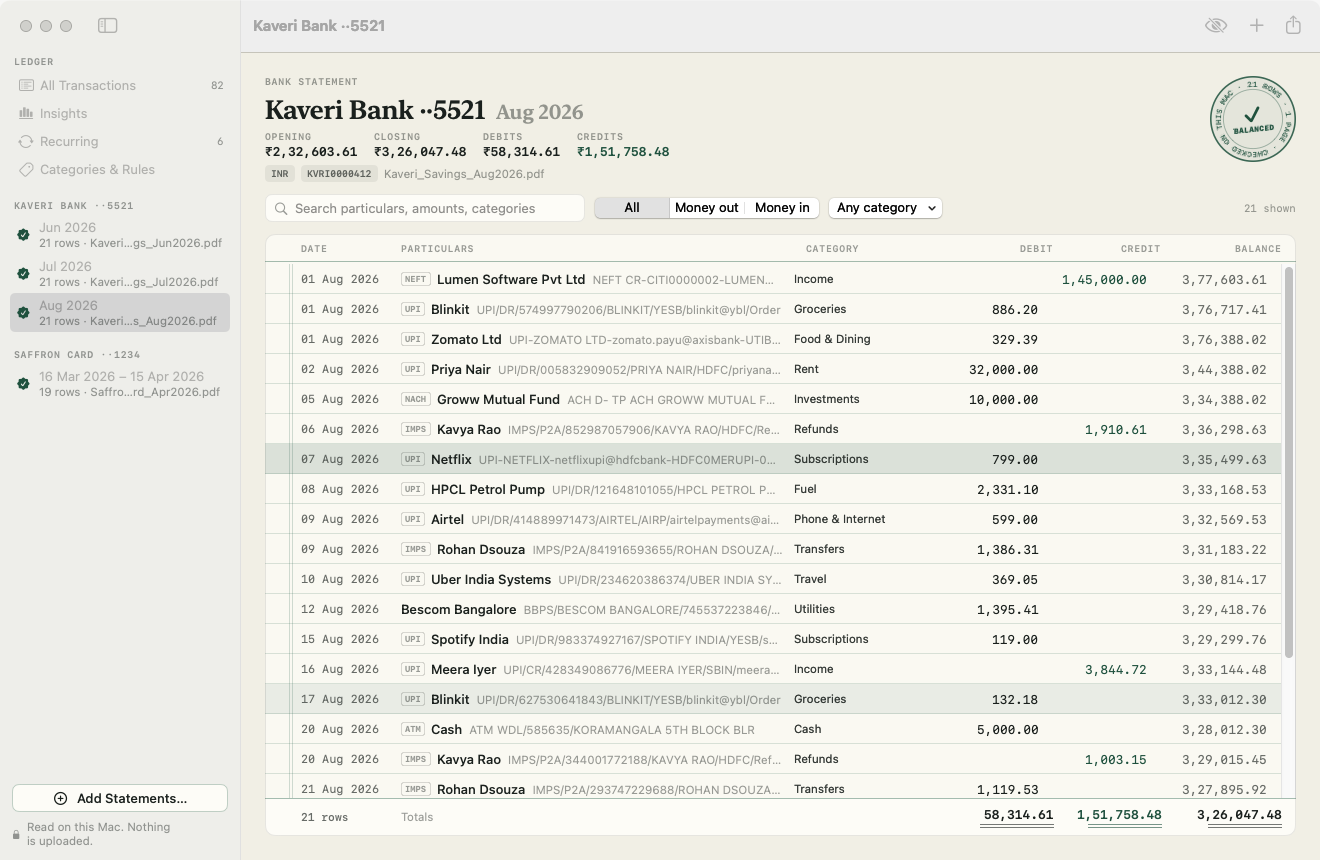
A working model, not a video — sample data. The bank and every name and number are made up, and nothing here leaves this page; the CSV is written in your browser. In Tabulate, add, the views and export take ⌘, and masking is ⌘⇧M.
- Statements never leave your Mac
- Every running balance checked
- Locked & scanned PDFs
- Pay once, no per-page fees
- 14-day refund
From a stack of PDFs to one honest ledger.
Drop in a month or a year of statements. Tabulate finds the table, reads every row, checks it against the printed balances and files it — all on your Mac.
The Balance Seal
Every printed running balance is checked against the rows above it. You see “Balanced ✓”, or the exact row that’s off and what its balance should be.
Never uploaded
PDFs are read with Apple’s PDFKit and scanned pages with Apple’s on-device OCR. No server sees a statement, ever — and you never pay by the page.
Any bank, any layout
It finds the table by its header, so it copes with split Debit/Credit columns, one signed Amount, Dr/Cr markers, newest-first statements, wrapped narrations and page breaks.
Indian formats built in
Lakh grouping (1,23,456.78), Dr/Cr suffixes and dd/mm dates just work. UPI, NEFT, IMPS, NACH and ATM narrations are read down to the payee’s name. US, UK and European statements too.
Locked and scanned PDFs
Type a bank’s DOB or PAN-style password once and Tabulate can keep it in your Keychain for next month. Scanned statements are read with on-device OCR — give those rows a quick look.
Edit like a ledger
Double-click any figure to correct it and the seal re-checks as you type. Insert a missed row, delete a stray one, and undo anything.
One ledger for every account
Merge months and accounts. Rows repeated across overlapping statements are left out, and a card bill paid from savings is recognised as a transfer.
Categories that learn
319 built-in rules know Swiggy, BESCOM, IRCTC, Zerodha and more. Right-click a row to say “always file Priya Nair under Rent”, and search across everything.
Subscriptions and EMIs, found
Monthly, quarterly and yearly payments are listed with their yearly cost and the next charge. When Netflix raises its price, you’ll see it.
Insights
Money in and out by month, spending by category and your top counterparties — with transfers between your own accounts left out if you like.
Exports accountants accept
Excel (.xlsx with real dates and lakh formatting), CSV, QuickBooks CSV, OFX, QIF and JSON. Tally XML comes with Payment, Receipt and Contra vouchers plus a ledgers file.
Mask before you share
Hide account, card and reference numbers and UPI IDs — on screen for a screen-share, or in the files you export.
Comparing statement converters? Read the guide: the best bank statement converters for Mac
Every balance, re-added.
A statement prints a running balance after each row. Tabulate starts from the opening balance, applies each debit and credit it read, and compares the result with the balance the bank printed — row by row, then the closing balance.
If a row was dropped, merged or misread, the balance stops matching right there. So you don’t have to trust the parser: the bank’s own arithmetic checks it.

Into Excel, Tally or your accountant’s inbox.
One ledger, seven formats. Pick the dates your software expects, choose one file per account, and mask numbers before a file leaves your hands.
- Excel — transactions plus a summary sheet, with real dates, real numbers and lakh formatting.
- Tally XML — Payment, Receipt and Contra vouchers, with categories as ledgers and uncategorised rows to Suspense A/c. It follows Tally’s documented import format, but versions differ: import into a test company on your Tally first.
- QuickBooks CSV, OFX, QIF — for QuickBooks, Quicken, GnuCash, Banktivity, Moneydance and Xero.
- CSV and JSON — every column, for anything else.
Green-ruled paper, light and dark.
Screenshots straight from Tabulate, with its made-up sample statements. Flip between light and dark.


What stays. What connects.
Online converters want your statements on their servers. Tabulate reads them where they already are.
Stays on your Mac
Your statements, and everything Tabulate reads from them.
- ✓Your statement PDFsRead where they are with PDFKit; scanned pages with Apple’s on-device OCR
- ✓Your ledger, edits and rulesSaved in
~/Library/Application Support/Tabulate - ✓Statement passwordsOnly if you tick “Remember”, in your login Keychain; forget them any time in Settings
- ✓Your exportsWritten where you choose, masked if you ask
- ✓How you use itNo account, no sync, no analytics in the app
Connects
Two small requests over HTTPS. Never a statement.
- 1License checkYour key and an activation ID, to Dodo Payments
- 2Update checkApp name and version, to
tabulate.newmac.app
The full list, for every app, is in the privacy policy.
Pay once. No per-page fees.
One payment, no subscription, any number of statements. Choose how many Macs you’ll use Tabulate on.
3 Macs
For home and office, or you and your accountant
5 Macs
For a family, a small office or a CA practice
Checkout opens soon. The buttons above go live here the moment it does.
Every plan includes
- One payment, no subscriptionEvery feature, any number of statements.
- License key by emailSent the moment you pay. Activate in one click.
- Move between MacsUse “Deactivate this Mac”, then activate on the new one.
- Free updatesNew versions install themselves.
- 14-day refundNot for you? Read the refund policy.
- macOS 14 or laterNative on Apple silicon & Intel.
Already bought? Download Tabulate · .zip · Install help
Questions, answered.
Does anything leave my Mac?
No. PDFs are read with Apple’s PDFKit and scanned pages with Apple’s on-device Vision OCR. Tabulate connects to the internet only to check your license and look for updates. It never sends your statements anywhere.
Which banks does it work with?
Any bank whose statement is a table with a header row (Date, Narration or Description, Debit/Credit or Amount, Balance). That covers the major Indian banks and cards — HDFC, ICICI, SBI, Axis, Kotak and more — plus US, UK and European formats in INR, USD, GBP and EUR. If a statement prints a running balance, the seal tells you whether every row was read right.
How accurate is it?
On our test set of 20 statement layouts, text PDFs come out exactly right, row for row. Scanned statements depend on scan quality: OCR can misread a character, so give those rows a quick look. The seal shows when a misread amount breaks the running balance, and you can correct the figure in place.
What about password-protected statements?
Tabulate asks once. If you choose, it saves the password in your login Keychain under that bank’s name and tries it automatically on next month’s file. You can forget saved passwords in Settings.
Does it import straight into Tally?
It writes Tally XML vouchers that you import from Gateway of Tally → Import → Vouchers, plus an optional ledgers file to import first under Masters. Categories become ledgers, and uncategorised rows go to Suspense A/c. The XML follows Tally’s documented import format, but Tally versions and company setups differ, so import into a test company on your version first and check the ledger names before a big import.
Which permissions does it ask for?
None. Tabulate only opens files you choose or drop in, and saves exports where you tell it.
What doesn’t it do?
It doesn’t connect to your bank or fetch statements, and it doesn’t read Excel or CSV statements, images or emails. It does no tax filing or GST reconciliation and has no cloud sync. Unusual layouts without a header row (some handwritten-style passbooks) may not be detected.
macOS says it can’t verify the developer.
Tabulate is distributed directly from this website. Here’s how to open it the first time.
Is there a free trial?
No. Use the working model at the top of this page to see how Tabulate works, and the app’s “Try a Sample Statement” button shows the whole app on a made-up statement before you add your own. If it turns out not to be for you, you can ask for a refund within 14 days — see the refund policy.
Can I use Tabulate on more than one Mac?
Yes. The 3-Mac and 5-Mac plans cover several Macs with one license key. Each Mac keeps its own ledger — there’s no sync. Any license can move to a new Mac: choose “Deactivate this Mac” in Tabulate on the old one, then activate on the new one.

Your statements, balanced.
Drop in last year’s PDFs this evening. By the time the kettle boils, they’re one checked ledger — and still only on your Mac.